 SaaSy
SaaSyIf your payroll involves signed dues authorizations, trust-fund remittances, or a wage determination stapled to the bid, this page is for you. Everyone else can head back to the features tour.
Five jobs your payroll desk stops doing by hand
Every calculation comes from the same payroll run, so the dues, the fringe, and the certified payroll always agree with each other.
Dues checkoff, calculated and remitted
Flat amount, percent of wages, or cents-per-hour: computed per member per pay period, with signed-authorization tracking so every deduction is backed by a card on file.
Authorization records retained for audit
CBA wage scales that keep themselves current
Classification and step rates straight from the agreement, apprentice progression handled automatically, and retroactive pay computed when a new CBA lands mid-period.
Retro pay runs in one pass, not a weekend
Taft-Hartley fringe, remitted per fund
Health & welfare, pension, and apprenticeship contributions calculated per hour worked and reported per trust fund. Each fund gets its own remittance, not a lump you have to split by hand.
Per-fund remittance reports, every period
WH-347 certified payroll, ready to file
Federal-aid public works paperwork generated from the same payroll run: WH-347 forms plus LCPtracker export, with prevailing-wage and Davis-Bacon classifications applied.
LCPtracker export included
NACHA files from your own bank
Dues and fund contributions move as ACH payment files you upload to your own bank. SaaSy never touches the money. You keep control of every disbursement.
Your bank, your accounts, your sign-off
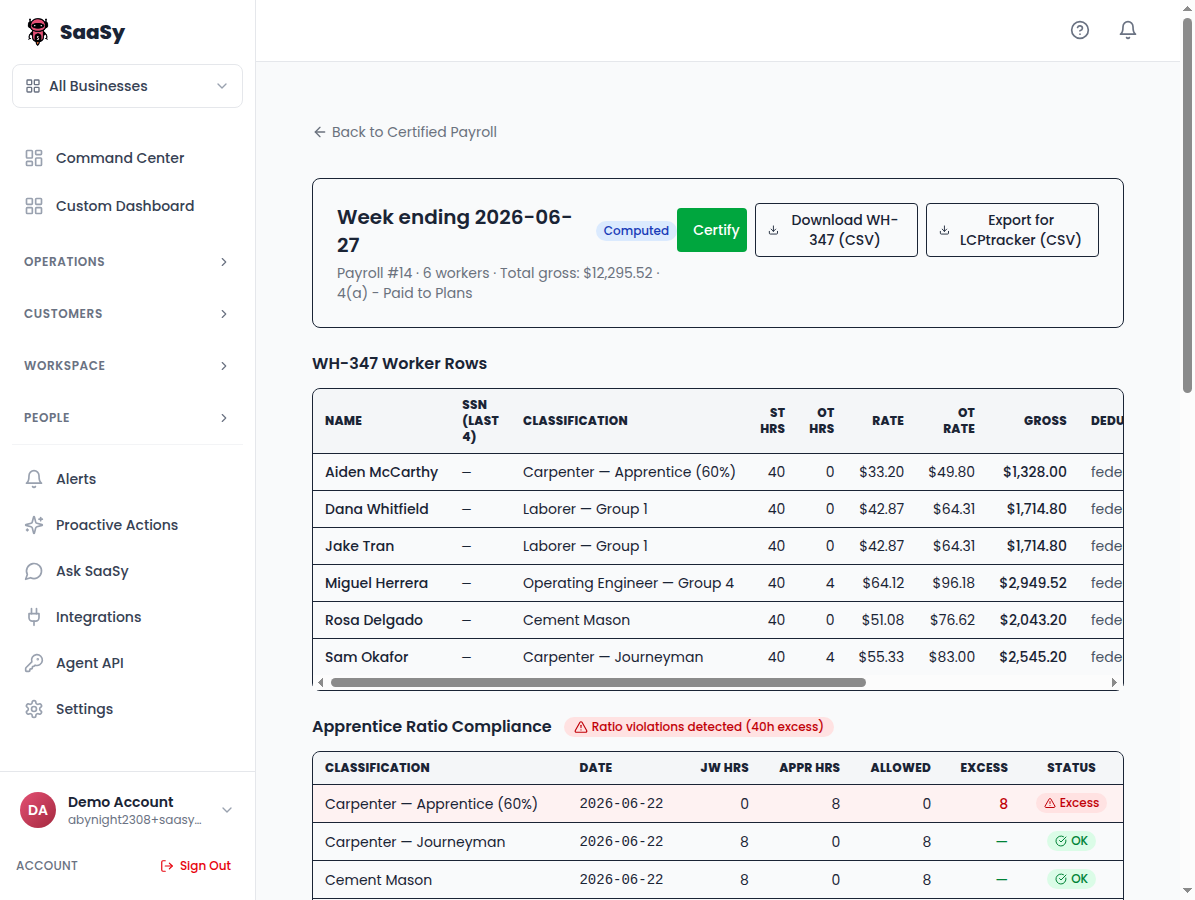
This is a real payroll run
Not a mockup: a WH-347 certified payroll run inside SaaSy. Six workers across four classifications on a Caltrans corridor job, with Saturday overtime and dues checkoff in the deductions. And look closely at the bottom panel: SaaSy caught an apprentice-ratio violation on this run before it could reach a compliance officer.
The CSV is the exact file the Download button produces in the app. Open it in Excel and check the math. SSNs are masked in this sample; real runs carry the last four digits the WH-347 requires.
Priced by active members
The add-on attaches to a Growth ($199/mo) or Scale ($399/mo) plan, so a 50-member shop runs $298/mo all in. No per-seat games: you pay for the members you actually remit for.
Up to 50 members
$79/mo billed annually
Up to 250 members
$199/mo billed annually
Larger rosters (250+) are custom-quoted: tell us your headcount and trades and we’ll price it same-day.
New to this world? The jargon, translated
If you just won your first public-works bid, here’s what everyone on this page has been talking about.
- Prevailing wage / Davis-Bacon
- On government-funded construction, you must pay at least the wage the government publishes for each trade in that county. Davis-Bacon is the federal law; most states have their own version. The published rates arrive as a “wage determination” attached to the bid.
- WH-347
- The federal certified-payroll form. Every week, for every worker on the job: hours per day, classification, rate, gross, deductions, net, signed under penalty of perjury. Miss one and the payments on the whole job can be withheld.
- Dues checkoff
- Deducting union dues from a member's paycheck and sending them to the local, but only for members with a signed authorization card on file. Flat amounts, a percent of wages, or cents per hour, depending on the CBA.
- Taft-Hartley fringe funds
- Health & welfare, pension, and apprenticeship money that doesn't go to the worker directly. It goes to jointly-managed trust funds, per hour worked, each fund with its own remittance report and deadline.
- LCPtracker
- The compliance portal many public agencies require contractors to upload certified payroll into. If your payroll system can't export to it, someone retypes every line.
- NACHA file
- The standard file format banks accept for batch ACH payments. It's how dues and fringe remittances actually move. You upload it to your own bank and approve the run.
The questions payroll admins ask first
- Does SaaSy hold or move the money?
- No. SaaSy calculates what's owed and generates the NACHA files; you upload them to your own bank and approve every disbursement. The money never passes through us.
- We have multiple CBAs across trades. Does that work?
- Yes. Each agreement carries its own classifications, wage scales, fringe schedules, and dues rules. Members are assigned per-CBA, and a payroll run applies the right agreement to the right person.
- We've run dues on the same desktop program for 20 years. How does our data get in?
- You don't retype anything. Send us whatever your current system exports (a spreadsheet, a report, anything that prints to CSV) and we load your member roster, classifications, dues rules, and authorization records for you during onboarding. You review the loaded roster against your own records before the first run.
- What about non-federal prevailing-wage jobs?
- State prevailing-wage classifications work the same way as Davis-Bacon: set the job's wage determination and certified payroll picks it up.
A straight answer on where this stands
SaaSy is in open beta and we’re onboarding union employers one at a time, founder-led. You won’t find a logo wall here yet. You’ll find the engineers who built the dues engine on your onboarding calls, and a payroll run you can inspect line by line above. If that trade works for you, we’ll earn the logo wall together.
Bring us your CBA
Attach your agreement right on the form, add your headcount, and we’ll return a same-day quote with your own dues, fringe, and certified payroll mapped out.
Talk to sales